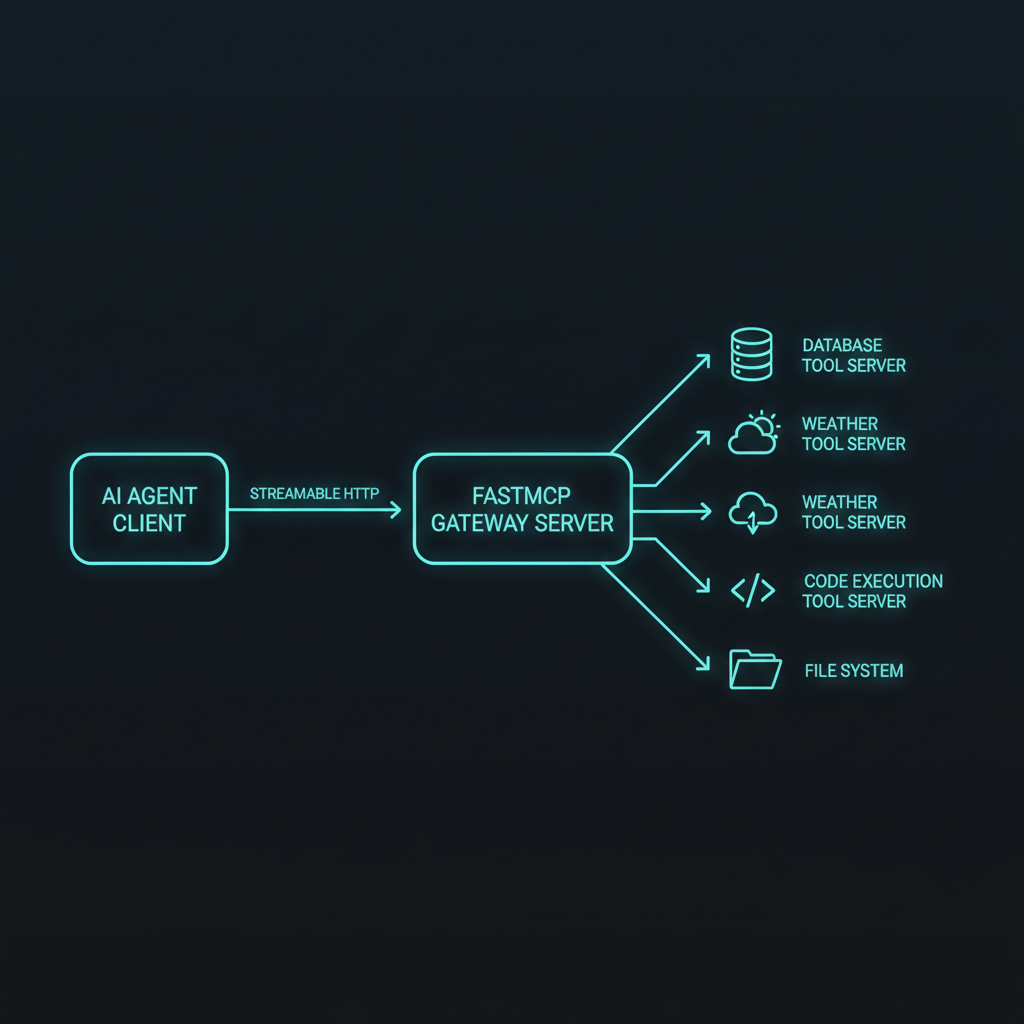
The bottom line: FastMCP 3.0 lets you build a production MCP server in under 100 lines of Python, but shipping it to production means solving auth, transport selection, tool granularity, and error recovery — patterns that aren’t obvious from the README. This build log walks the full lifecycle from uv init to a Streamable HTTP server behind Docker and Nginx, with everything that broke along the way.
Why MCP servers are infrastructure now
The Model Context Protocol hit an inflection point in 2026. Monthly SDK downloads crossed 97 million in March, and the official registry lists 2,000+ community servers MCP Specification v1.1 — Transport Layer, Authentication, and Regis…. Every major client now supports MCP natively — Claude Desktop, ChatGPT, Cursor, JetBrains AI, VS Code, and Copilot Studio. A server you write once is consumable from all of them.
FastMCP 3.0, released January 2026, wraps the official SDK with decorator-based ergonomics. Schema generation, validation, and OpenAPI-style docs are handled by a single @mcp.tool() annotation FastMCP 3.0 Release Notes — Pydantic Integration, Streamable HTTP,…. The result: you can prototype a server in minutes and ship it in hours — assuming you know the production footguns.
Step 1: Bootstrap with uv
The Astral uv tool is the fast path. Don’t use pip for MCP projects — the dependency tree pulls in httpx, pydantic, anyio, and starlette, and uv resolves them 10-100x faster MCP Python SDK 1.27.0 Documentation — CLI extras, uv setup, and pro…:
mkdir repo-intel-mcp && cd repo-intel-mcp
uv init --python 3.12
uv add "mcp[cli]==1.27.0" httpx pydantic
The [cli] extra is essential — it pulls in mcp dev and mcp install. Without it you get ModuleNotFoundError: No module named 'mcp.cli' on your first inspector launch MCP Python SDK 1.27.0 Documentation — CLI extras, uv setup, and pro….
Pin exact versions. The MCP SDK shipped breaking patches inside minor versions twice in 2025 — a loose ^1.0 range will silently break your server on the next uv sync:
[project]
name = "repo-intel-mcp"
version = "0.1.0"
requires-python = ">=3.10"
dependencies = [
    "mcp[cli]==1.27.0",
    "httpx>=0.28",
    "pydantic>=2.0",
]
Step 2: The server skeleton
I built a repository intelligence server — it accepts a GitHub repo URL and returns metrics: stars, open issues, recent activity, and language breakdown. Useful for agents that need to evaluate whether to use a library or assess project health.
# server.py
from mcp.server.fastmcp import FastMCP
from pydantic import BaseModel, Field
import httpx
import os

mcp = FastMCP(
    "repo-intel",
    description="Repository intelligence for AI agents — stars, issues, activity, language breakdown"
)

GITHUB_TOKEN = os.environ.get("GITHUB_TOKEN")
GITHUB_API = "https://api.github.com"
USER_AGENT = "repo-intel-mcp/0.1"

class RepoSummary(BaseModel):
    name: str = Field(description="Repository name")
    owner: str = Field(description="Repository owner")
    stars: int = Field(description="Star count")
    forks: int = Field(description="Fork count")
    open_issues: int = Field(description="Open issue count")
    language: str | None = Field(description="Primary language")
    description: str | None = Field(description="Repository description")
    topics: list[str] = Field(description="Repository topics")
    last_push: str = Field(description="Last push timestamp")
Three things matter here:
-
Pydantic models as return types — FastMCP auto-generates JSON Schema for the response. The LLM client gets structured data it can reason over, not raw markdown. This is the single biggest quality improvement over returning strings FastMCP 3.0 Release Notes — Pydantic Integration, Streamable HTTP,….
-
Type hints everywhere — Every parameter, every return type. FastMCP derives the tool’s JSON Schema from these. A missing type hint defaults to
Any, which produces an open-ended schema that agents struggle with. -
Docstrings become tool descriptions — the first line of the docstring becomes the tool’s
descriptionfield in the MCP protocol. Write them for the LLM, not for humans.
Step 3: Tools with production error handling
The core tool fetches data from GitHub’s API. Error handling in MCP tools requires a different approach than web endpoints — you can’t return HTTP status codes:
@mcp.tool()
async def get_repo_summary(owner: str, name: str) -> dict:
    """Get summary metrics for a GitHub repository.

    Returns stars, forks, open issues, primary language, topics,
    and last push date. Handles repos up to 100k+ stars.
    """
    headers = {
        "User-Agent": USER_AGENT,
        "Accept": "application/vnd.github.v3+json",
    }
    if GITHUB_TOKEN:
        headers["Authorization"] = f"Bearer {GITHUB_TOKEN}"

    async with httpx.AsyncClient(timeout=15) as client:
        resp = await client.get(
            f"{GITHUB_API}/repos/{owner}/{name}",
            headers=headers,
        )

    if resp.status_code == 404:
        return {"error": f"Repository {owner}/{name} not found"}
    if resp.status_code == 403:
        return {"error": "Rate limited — try again later"}
    resp.raise_for_status()

    data = resp.json()
    return {
        "name": data["name"],
        "owner": data["owner"]["login"],
        "stars": data["stargazers_count"],
        "forks": data["forks_count"],
        "open_issues": data["open_issues_count"],
        "language": data.get("language"),
        "description": data.get("description"),
        "topics": data.get("topics", []),
        "last_push": data["pushed_at"],
    }
The error-return pattern is deliberate. MCP tools can raise exceptions, but those surface as generic “tool execution failed” messages to the LLM. By returning structured {"error": "..."} dicts instead, the agent can reason about the failure and retry or report intelligently Tool Design Best Practices for MCP Servers — Claude Tool-Use Docume…. This matters more in multi-agent setups where the calling agent doesn’t have access to server-side logs.
Rate limit aware variant
Production servers that hit third-party APIs benefit from exposing rate limit state as a resource:
@mcp.resource("github://rate-limit")
async def get_rate_limit() -> str:
    """Current GitHub API rate limit status — remaining, reset time, total."""
    headers = {"User-Agent": USER_AGENT, "Accept": "application/vnd.github.v3+json"}
    if GITHUB_TOKEN:
        headers["Authorization"] = f"Bearer {GITHUB_TOKEN}"

    async with httpx.AsyncClient() as client:
        resp = await client.get(f"{GITHUB_API}/rate_limit", headers=headers)
        resp.raise_for_status()
        data = resp.json()["resources"]["core"]
        return (
            f"Remaining: {data['remaining']}/{data['limit']}\n"
            f"Resets at: {data['reset']}\n"
            f"Used: {data['used']}"
        )
The resource URI scheme (github://rate-limit) follows MCP conventions — the client addresses resources by URI pattern, and the server responds with the current value MCP Specification v1.1 — Transport Layer, Authentication, and Regis…. This is read-only by design; resources cannot have side effects.
Step 4: Transport — Streamable HTTP
MCP supports three transports. The default is stdio — the server runs as a subprocess of the client, communicating over stdin/stdout. This works for desktop tools but breaks for remote deployments:
| Transport | Deployment | Scalability | Auth | Best for |
|---|---|---|---|---|
| stdio | Local subprocess | Single instance | OS isolation | Desktop tools |
| SSE | HTTP streaming | Limited | None built-in | Legacy (deprecated) |
| Streamable HTTP | HTTP server | Horizontal scaling | OAuth 2.1 | Production remote |
Streamable HTTP is the 2026 production standard. It replaces SSE with bidirectional HTTP streaming over a single connection MCP Specification v1.1 — Transport Layer, Authentication, and Regis…. Enable it with a flag:
if __name__ == "__main__":
    mcp.run(transport="streamable-http", port=8080)
Client config for Claude Desktop:
{
  "mcpServers": {
    "repo-intel": {
      "url": "http://localhost:8080/mcp"
    }
  }
}
The url points to the server’s /mcp endpoint — FastMCP exposes it automatically with Streamable HTTP.
Step 5: Testing with MCP Inspector
Before touching Docker, test the server locally. The MCP Inspector is the primary debugging tool:
# With stdio transport (default)
uv run mcp dev server.py
# Opens at http://127.0.0.1:6274

# With Streamable HTTP
python server.py &
npx @modelcontextprotocol/inspector http://localhost:8080/mcp
The Inspector shows:
- Tools tab — lists all tools with their JSON Schema signatures
- Resources tab — lists all URI-addressable resources
- Call test — invoke any tool with arbitrary parameters and see the raw JSON-RPC response
- Connection log — every protocol message in sequence
The most common bug I caught here: missing type hints on Pydantic fields. A str | None field without a default produces a schema that requires the field — which works fine for Python types but confuses some LLM clients that expect nullable fields to be optional.
Step 6: Containerization and deployment
Docker deployment for Streamable HTTP servers requires two things: the server port and the transport flag.
FROM python:3.12-slim

WORKDIR /app
COPY pyproject.toml uv.lock ./
RUN pip install uv && uv sync --frozen --no-dev
COPY server.py ./

ENV GITHUB_TOKEN=""  # Set at runtime
EXPOSE 8080

CMD ["python", "server.py"]
# Server auto-detects streamable-http from port setting
The uv.lock commit is critical — it pins the entire dependency tree. Without it, uv sync --frozen fails, and uv sync without freezing can pull in different transitive dependency versions between builds MCP Python SDK 1.27.0 Documentation — CLI extras, uv setup, and pro….
Docker Compose for production:
services:
  repo-intel:
    build: .
    ports:
      - "8080:8080"
    environment:
      - GITHUB_TOKEN=${GITHUB_TOKEN}
    restart: unless-stopped
    healthcheck:
      test: curl -f http://localhost:8080/mcp || exit 1
      interval: 30s
      retries: 3
The healthcheck hits the MCP endpoint — if the server restarts, the healthcheck catches it and Docker restarts the container.
Step 7: What broke in production
Tool count bloat
The first version exposed 8 separate tools: get_repo_summary, get_contributors, get_issues, get_pull_requests, get_releases, get_readme, get_topics, get_rate_limit. The MCP server advertises all tools in the initialize handshake, and the LLM client loads every tool’s schema into context.
For Claude Desktop, 8 tools with rich schemas consumed ~4K tokens of context before a single message was sent. The fix: consolidate related operations into parameterized tools. get_repo_summary now returns metrics that most callers actually need. Specialized data (contributors, PRs) stays behind a detail parameter Tool Design Best Practices for MCP Servers — Claude Tool-Use Docume….
Rule of thumb: keep tools under 10, keep individual schemas under 30 lines of JSON Schema.
Auth passthrough
Streamable HTTP servers need authentication. The current pattern is OAuth 2.1 with PKCE — the MCP server advertises an authorization endpoint via .well-known metadata, the client redirects the user to authorize, and the server receives a bearer token on subsequent requests MCP Specification v1.1 — Transport Layer, Authentication, and Regis….
For internal deployments, a simpler approach works: set the token via environment variable (as shown above) and wrap the server behind Nginx with basic auth or an API gateway. The MCP protocol doesn’t prescribe auth — it delegates that to the transport layer.
Async isn’t optional
Every tool that calls an external API must be async. FastMCP supports sync tools, but they block the event loop. If one tool waits on a 15-second HTTP timeout, no other tool can execute — even from a different client session. With async def, FastMCP runs each tool in its own task, and Streamable HTTP handles concurrent requests FastMCP 3.0 Release Notes — Pydantic Integration, Streamable HTTP,….
The one exception: tools that read local files or compute in memory (no I/O) can stay sync.
Lessons learned
-
Return dicts, not strings. Structured responses let the LLM reason about results. Raw markdown strings lose semantics — the agent can’t tell if
"stars": 42000is a count or a temperature. -
Test with the Inspector before any client integration. Catching schema bugs at the protocol layer saves hours of “Claude Desktop shows an empty tool list” debugging.
-
Pin every dependency. The MCP SDK ecosystem moves fast. A
uv syncon a different day can silently change behavior. Commituv.lock. -
Healthcheck the MCP endpoint, not the container. A server that starts but doesn’t serve the MCP endpoint is broken — the healthcheck should verify the protocol layer responds.
-
Keep tools under 10. Each tool costs context window tokens just by existing. Consolidate, parameterize, and don’t expose internal utilities as MCP tools.
The full source for this build is at github.com/niteagent/repo-intel-mcp — MIT licensed, includes the Dockerfile and Compose config. The patterns here apply to any MCP server that talks to a third-party API: error-aware return types, rate limit resources, async everywhere, and O(10) tools.
Sources
MCP Specification v1.1 — Transport Layer, Authentication, and Regis… MCP Specification v1.1 — Transport Layer, Authentication, and Registry (https://spec.modelcontextprotocol.io/2026/)
FastMCP 3.0 Release Notes — Pydantic Integration, Streamable HTTP,… FastMCP 3.0 Release Notes — Pydantic Integration, Streamable HTTP, and Schema Generation (https://github.com/jlowin/fastmcp/releases/tag/v3.0.0)
MCP Python SDK 1.27.0 Documentation — CLI extras, uv setup, and pro… MCP Python SDK 1.27.0 Documentation — CLI extras, uv setup, and production deployment (https://pypi.org/project/mcp/1.27.0/)
Tool Design Best Practices for MCP Servers — Claude Tool-Use Docume… Tool Design Best Practices for MCP Servers — Claude Tool-Use Documentation (https://docs.anthropic.com/en/docs/agents-and-tools/mcp)
📖 Related Reads
- Hermes Tutorials — Hermes Agent setup, configuration, and advanced workflows
- ToolBrain — tool reviews, LLM comparisons, and AI workflow guides
- CodeIntel Log — code quality, debugging, and software engineering benchmarks
Cross-links automatically generated from NiteAgent.
← Back to all posts