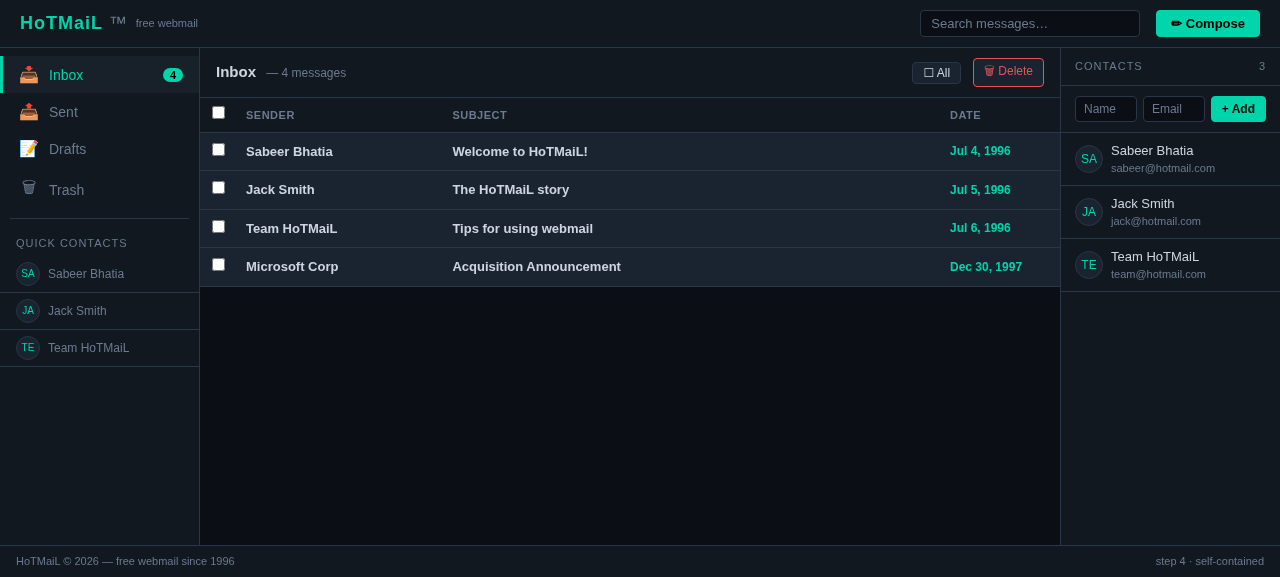
1996 Webmail — Inbox layout, folder sidebar, compose/send flow, search, contact list, localStorage persistence. Hotmail launched on July 4, 1996 — founded by Sabeer Bhatia and Jack Smith as “HoTMaiL” (a nod to HTML). It was the first free web-based email service, making email accessible to anyone with a browser. Within 18 months it had 8.5 million subscribers and was acquired by Microsoft in December 1997 for $400 million. This clone builds a webmail client from scratch, teaching the three-panel layout (sidebar, message list, compose overlay) that every email service uses today.
HTML Structure
CompleteWhy learn this?
Every webmail interface — Gmail, Outlook, Yahoo Mail — shares the same layout: a folder sidebar, a message list with sender/subject/date, and a compose overlay. This three-panel pattern is the most common data-display UI on the web. Building it teaches CSS Grid for layout, semantic HTML5 landmarks (<nav>, <main>, <table>), and the overlay pattern used across dashboards and web apps.
Design decisions & tradeoffs
CSS Grid for layout. The page uses grid-template-columns: 200px 1fr for the sidebar+content split. The alternative — float-based layouts or flexbox — both work but Grid handles the fixed-sidebar/flexible-content pattern most cleanly. The 200px sidebar is wide enough for folder names with unread counts without wasting space.
Table for message list. Email messages are tabular data (From, Subject, Date). A <table> with table-layout: fixed is semantically correct and handles column alignment natively — something CSS flexbox rows cannot do without manual width coordination.
Compose as overlay vs separate page. The compose form is a <section> within the same page, toggled by a CSS class. This mirrors how real webmail works — the inbox stays visible behind the compose view. A separate compose page would require URL routing and back-button handling.
Browser compatibility
- CSS Grid: Supported in all browsers since 2020. No prefix needed.
table-layout: fixed: Supported since IE 5. The most universally compatible layout property.hiddenattribute: HTML5 global. Supported since IE 11.
Accessibility details
- Sidebar navigation semantics. The folder sidebar uses
<div>elements with click handlers. Use<nav aria-label="Folders">with<button>elements for proper keyboard accessibility and screen reader announcements. - Compose overlay focus management. When the compose overlay opens, focus should move to the first input (To field). When it closes, focus should return to the Compose button. Without focus management, keyboard users are stranded.
- Table semantics for message list. The message list is a
<table>with<thead>and<tbody>— semantically correct. Each row is interactive (clickable), but screen readers don't announce rows as actionable. Addrole="button"ortabindex="0"to rows for accessibility. - Compose form label associations. Each input has an associated
<label for="...">. This is WCAG 3.3.2 compliance — clicking the label focuses the input, and screen readers announce the label on focus. - Overlay backdrop. The compose overlay uses a semi-transparent backdrop that is purely visual — no
aria-hiddenon the background content. When the overlay is open, setaria-hidden="true"on the main content to prevent screen readers from accessing background elements.
Common pitfalls
- Missing
table-layout: fixed. Without it, column widths shift as content changes because the browser auto-sizes. - Forgetting
event.preventDefault()on form submit. Without it, the browser reloads the page. - Storing the compose form inside the sidebar. It should be an overlay, not embedded.
Key concepts
display: grid— Two-column sidebar + content layout. Foundation of dashboard UIs<table> with table-layout: fixed— Structured message list with aligned columns<form>— Semantic compose form. No JavaScript required for basic structuredata-folder— Custom HTML data attributes. Carries folder metadata in the DOMhidden class— CSS-based visibility toggle for the compose overlay
Next up
Step 2 adds the iconic Hotmail aesthetic: a CSS-only plaid checkered background, blue gradient header, read/unread message styling, and folder sidebar active states.
<div class="layout">
  <nav class="sidebar">
    <div class="folder active"
      data-folder="inbox">
      <span>Inbox</span>
      <span class="count">3</span>
    </div>
    <div class="folder"
      data-folder="sent">
      <span>Sent</span>
    </div>
  </nav>
  <main class="content">
    <table>
      <thead>
        <tr><th>From</th>
          <th>Subject</th>
          <th>Date</th></tr>
      </thead>
      <tbody id="messages">
        <tr class="unread" data-id="1">
          <td>Alice Chen</td>
          <td>Project update</td>
          <td>Jul 17</td>
        </tr>
      </tbody>
    </table>
  </main>
</div><section id="compose"
class="hidden">
<div class="compose-card">
<h2>New Message</h2>
<form id="compose-form">
<label>To:</label>
<input type="email"
id="to" required>
<label>Subject:</label>
<input type="text"
id="subject">
<label>Message:</label>
<textarea id="body"
rows="6"></textarea>
<div class="actions">
<button type="submit">
Send</button>
<button type="button"
id="cancel">Cancel</button>
</div>
</form>
</div>
</section><section> with position: fixed + backdrop) keeps the inbox in view, preventing navigation context loss — a UX insight still relevant today.CSS Styling
CompleteWhy learn this?
The 1996 Hotmail aesthetic is iconic: a tiled plaid/checkered background, blue gradient header, and clean table layout. This step teaches CSS-only background patterns using repeating-linear-gradient — a technique that creates textile-like patterns without images. You also learn read/unread styling with font-weight and box-shadow, table row hover effects, and sticky headers.
Design decisions & tradeoffs
CSS-only plaid vs image. Two repeating-linear-gradient layers (horizontal + vertical stripes) create the plaid pattern. Zero HTTP requests, resolution-independent, infinitely customizable. The tradeoff is minimal GPU compositing cost from the gradient rendering.
Read/unread with bold text. Unread messages get font-weight: 700 plus a teal left-border via box-shadow. This works universally — no color perception dependency, no language barriers.
Gradient header with blue accent. The header uses linear-gradient(135deg, #0066CC, #004d99) — a diagonal blue gradient that matches Hotmail's 1996 brand. White text on the gradient provides clear contrast. The alternative — a flat blue header — would be simpler but lacks the depth gradient provides.
Table row hover for feedback. Rows highlight on hover with a subtle background shift. This provides interactive feedback without requiring click-to-select — a pattern standard in every data table since.
Browser compatibility
repeating-linear-gradient(): Supported since Chrome 26, Firefox 16, Safari 6.1, IE 10. The plaid background works in all modern browsers. IE 9 shows the solid fallback color.linear-gradient(): Supported since Chrome 26, Firefox 16, Safari 6.1, IE 10. Used for the header gradient. Falls back to flat color in IE 9.box-shadow: Supported since Chrome 4, Firefox 3.5, Safari 5, IE 9. Used for the unread indicator. Falls back silently in IE 8.position: sticky: Supported since Chrome 56, Firefox 59, Safari 13. Used for sticky table headers. In older browsers, headers scroll with content — functional but less usable.background-blend-mode: multiply: Supported since Chrome 35, Firefox 30, Safari 7.1. Blends the two gradient layers for the plaid effect. Without it, the two gradient layers overlay visibly — still readable but less fabric-like.
Accessibility details
- Read/unread distinction with non-color cues. The unread indicator uses both
font-weight: 700and a teal box-shadow border — a dual-signal approach that doesn't rely solely on color. Users with color vision deficiency still perceive the bold text as "important." - Table row hover effect. The hover effect is purely decorative — it does not convey information. However, if it's the only way to identify clickable rows, keyboard users miss the signal. Ensure rows are visually identifiable as interactive without hover.
- Background pattern contrast. The plaid pattern uses very low opacity (
rgba(0,212,170,0.02)) — subtle enough to not interfere with text readability. The solid#0d0d12background provides the base contrast. Text is white on this dark background — ~14:1 contrast ratio. - Sticky header visual separation. The sticky table header uses a background color to separate from scrolling content. Ensure the header background is sufficiently opaque to prevent text from showing through when scrolling.
- Focus indicators on interactive elements. The folders, compose button, and table rows lack explicit focus-visible styles. Tab through the page and add
:focus-visiblestyles matching the hover state for keyboard accessibility.
Common pitfalls
- Wrong gradient angle.
0deg= horizontal stripes,90deg= vertical. You need both for plaid. - Missing fallback background. Always set a solid
background-colorbefore the gradient. - Stripe width too large. Stripes wider than 2px look like a grid, not fabric.
Key concepts
repeating-linear-gradient()— Creates tiled patterns. Two layers (H+V) make plaidbackground-blend-mode: multiply— Blends gradient layers for the plaid effectfont-weight: 700 vs 400— Read/unread distinctionposition: sticky— Sticky table header that stays visible during scrolllinear-gradient(135deg, ...)— Diagonal gradient for the headerbox-shadow: inset— Inset shadow creates the left-border unread indicator
Next up
Step 3 adds JavaScript: compose toggle, send message, click-to-mark-as-read, and folder switching.
body {
  background: #0d0d12;
  background-image:
    repeating-linear-gradient(
      0deg, transparent, transparent 2px,
      rgba(0,212,170,0.02) 2px,
      rgba(0,212,170,0.02) 4px
    ),
    repeating-linear-gradient(
      90deg, transparent, transparent 2px,
      rgba(0,212,170,0.02) 2px,
      rgba(0,212,170,0.02) 4px
    );
}.header {
background: linear-gradient(
135deg, #0066CC, #004d99
);
padding: 12px 20px;
color: #fff;
}
.unread td {
font-weight: 700;
box-shadow: inset 3px 0 0
var(--accent, #00d4aa);
}
tr:hover {
background: rgba(255,255,255,0.03);
}thead th {
position: sticky;
top: 0;
background: #1a2332;
z-index: 1;
}repeating-linear-gradient creates a subtle checkered fabric effect by overlaying horizontal and vertical 2px stripes. The key is using very low opacity (0.02) — anything above 0.04 looks like a grid overlay. The background-blend-mode: multiply is critical — without it, the stripes overlay rather than intersect, creating a crosshatch instead of a true plaid. For the header, linear-gradient(135deg, #0066CC, #004d99) creates a diagonal that mimics light hitting the blue surface at an angle — Hotmail's original brand color.JavaScript
CompleteWhy learn this?
Compose, send, read, and folder-switch are the core CRUD operations of any messaging system. This step adds client-side JavaScript to make the static layout functional. You learn the compose-view toggle pattern, form submission with preventDefault(), click-to-mark-as-read via event delegation, and folder switching with data attributes — four patterns that appear in every interactive web app.
Design decisions & tradeoffs
Event delegation. A single click listener on <tbody> catches all row clicks via event bubbling. The alternative — a listener on each <tr> — creates 10+ listeners that need re-attaching after every render. One delegated listener is O(1).
Data array + render function. Messages live in a JavaScript array. renderMessages() rebuilds the DOM from the array. This unidirectional data flow (state → render) is the same pattern React, Vue, and Svelte use.
Class toggle for compose overlay. The compose form uses classList.toggle('hidden') for show/hide. The alternative — setting style.display directly — works but mixes presentation logic into JavaScript. CSS classes keep styling concerns in CSS where they belong.
data-folder for routing. Each folder button carries a data-folder attribute. The switch function reads this attribute to determine which messages to display. This is the declarative routing pattern — the HTML declares the available routes, and JS reads them. Adding a new folder requires only HTML (no JS changes).
Browser compatibility
classList.toggle(): Supported since Chrome 8, Firefox 3.6, Safari 5.1. Used for compose visibility and folder active states.event.preventDefault(): Supported universally. Form submission interception works in all browsers.Array.filter(): Supported since Chrome 1, Firefox 1.5, Safari 3. Used for folder filtering.HTMLElement.dataset: Supported since Chrome 7, Firefox 6, Safari 5.1. Readsdata-foldervalues.Element.closest(): Supported since Chrome 41, Firefox 35, Safari 6. Used for event delegation on table rows.textContent: Supported universally. Used for setting dynamic content safely (no XSS vector likeinnerHTML).
Accessibility details
- Compose toggle as button. The Compose button should be a native
<button>— keyboard accessible (Enter/Space to activate) and announced by screen readers. If it's a<div>or<span>withonclick, it's not keyboard accessible withouttabindex="0"androle="button". - Focus management on compose open/close. When compose opens, focus should move to the To field. When it closes (cancel or send), focus should return to the Compose button. Without this, keyboard users lose their place on the page.
- Mark-as-read event delegation. The click handler on
<tbody>usese.target.closest('tr')— this catches clicks on<td>elements and finds the parent row. Works for mouse clicks. Keyboard users navigating row-by-row with Tab won't trigger this — add a keydown handler for Enter/Space. - Folder active state announcement. The active folder is visually indicated by a CSS class. Screen readers don't announce this state change. Use
aria-current="page"on the active folder button, oraria-pressed="true"depending on the role. - Dynamic content not announced. When
renderMessages()replaces the table body content, screen readers don't announce the change. Addaria-live="polite"to the message list container so updated content is announced.
Common pitfalls
- Missing
preventDefault()on form submit. The browser reloads the page. Always calle.preventDefault()first. - Mutating the original array.
filter()returns a new array. Butpush()andsplice()mutate. Keep a single source-of-truth array. - innerHTML vs textContent for user data. Using
innerHTMLto render message subjects opens XSS vectors. UsetextContentorcreateTextNode()when rendering user-supplied content.
Key concepts
event delegation— Single listener on parent. Catches all child events via bubblingdata-folder— Custom data attribute for folder routingArray.filter() + render()— Filter data, rebuild the viewclassList.toggle()— Show/hide compose overlayevent.preventDefault()— Prevent page reload on form submitArray.map() + join('')— Transform array to HTML string
Next up
Step 4 adds search, contacts, and localStorage persistence — making the demo a fully usable webmail client.
let messages = [
  { id: 1, from: 'Alice Chen',
    subject: 'Project update',
    date: 'Jul 17',
    folder: 'inbox', read: false }
];

let currentFolder = 'inbox';

function renderMessages() {
  const filtered = messages
    .filter(m =>
      m.folder === currentFolder);
  const tbody = document
    .getElementById('messages');
  tbody.innerHTML = filtered
    .map(m => `<tr
      class="${m.read?''
        :'unread'}"
      data-id="${m.id}">
      <td>${m.from}</td>
      <td>${m.subject}</td>
      <td>${m.date}</td>
    </tr>`).join('');
}

function switchFolder(name) {
  currentFolder = name;
  document.querySelectorAll('.folder')
    .forEach(f => f.classList
    .toggle('active',
      f.dataset.folder === name));
  renderMessages();
}document.getElementById('compose-form')
.addEventListener('submit', e => {
e.preventDefault();
const msg = {
id: Date.now(),
from: 'You',
to: document.getElementById('to')
.value,
subject: document
.getElementById('subject').value,
body: document
.getElementById('body').value,
date: new Date()
.toLocaleDateString('en-US',
{ month: 'short',
day: 'numeric' }),
folder: 'sent', read: true
};
messages.push(msg);
closeCompose();
renderMessages();
});document.getElementById('messages')
.addEventListener('click', e => {
const row = e.target.closest('tr');
if (!row) return;
const id = parseInt(
row.dataset.id);
const msg = messages
.find(m => m.id === id);
if (msg) {
msg.read = true;
renderMessages();
}
});<tr> (which would need re-attaching after every render), a single listener on <tbody> catches clicks via event bubbling. The e.target.closest('tr') call walks up the DOM tree from wherever the user clicked (a <td>, the text node, etc.) to find the row. This is the standard pattern for any data list — inbox rows, contact lists, search results — and keeps listener count at O(1) regardless of row count.Search, Contacts & Persistence
CompleteWhy learn this?
A webmail client that loses all messages on refresh is useless. This step adds the three features that turn a demo into a real app: full-text search (filter messages by any field), a contact list with CRUD, and localStorage persistence that survives page reloads. These patterns — search-by-multiple-fields, contact CRUD, serialize/save/load — appear in every application that stores user data.
Design decisions & tradeoffs
localStorage vs IndexedDB. localStorage is synchronous, simple, and stores key-value pairs as strings. For a demo with under 100 messages, its simplicity wins over IndexedDB's async API and 5MB limit. For production, use IndexedDB — it's non-blocking and has no practical size cap.
Case-insensitive includes for search. String.includes() after lowercasing both query and data. The alternative — regex — supports patterns but adds complexity. Include-based search is good enough: "proj" matches "Project update."
Contact list as sidebar section vs popup. Contacts are rendered as a collapsible section in the sidebar. The alternative — a popup or separate view — would need more navigation state. The sidebar approach keeps contacts accessible without hiding the message list.
Persistent state across refreshes. loadData() runs on page load to restore messages and contacts from localStorage. This makes the demo feel like a real app — data survives browser refreshes and even tab closures (within the same origin).
Browser compatibility
localStorage.setItem/getItem: Supported since IE 8, Chrome 4, Firefox 3.5, Safari 4. Universal support. 5MB limit per origin.JSON.stringify/parse: Supported since IE 8, Chrome 1, Firefox 3, Safari 4. Used for object serialization.String.prototype.includes(): Supported since Chrome 41, Firefox 40, Safari 9. Used for search matching. Falls back toindexOf() !== -1in IE 11.Array.prototype.some(): Supported since Chrome 1, Firefox 1.5, Safari 3. Used for multi-field search.textContent: Supported universally. Used for safe content rendering.
Accessibility details
- Search input needs a label. The search input has no
<label>. Add<label for="search" class="sr-only">Search messages</label>for screen reader support. Placeholder text is not a substitute — it disappears on input. - Search results not announced. When the search filters messages, the updated list is not announced to screen readers. Add
aria-live="polite"to the message list container. - Contact list items as actionable. Contact items show an email address and are clickable (to open compose with that recipient). If they're
<div>or<span>elements, they needrole="button",tabindex="0", and keyboard event handlers. Use<button>elements for proper semantics. - localStorage notice. Users in private browsing modes may get errors when trying to write to localStorage. The app should handle
QuotaExceededErrorandSecurityErrorexceptions gracefully, falling back to in-memory operation. - Dynamic DOM updates. Both search and contact CRUD modify the DOM dynamically. Ensure all dynamic content is keyboard accessible and screen-reader friendly.
Common pitfalls
- Storing Date objects in localStorage. They become ISO strings. Always reconstruct with
new Date()after loading. - Forgetting to save on every mutation. Use a single
saveData()function called after every add/delete/edit. - localStorage quota exceeded. Always wrap
setItemin a try/catch. Private browsing and full storage will throw errors.
Key concepts
localStorage.setItem/getItem— Persist data across page reloadsJSON.stringify/parse— Serialize objects to strings for storageString.includes()— Case-insensitive field matching for searchArray.some()— OR-based multi-field searchtry/catch for localStorage— Handle quota and security errors gracefullytextContent vs innerHTML— Safe content rendering prevents XSS
Next up
Your Hotmail Clone is complete! You've built a functional webmail client with compose, send, folder switching, search, contacts, and data persistence. View the live demo →
searchInput.addEventListener(
  'input', () => {
  const q = searchInput.value
    .trim().toLowerCase();
  if (!q) {
    switchFolder(currentFolder);
    return;
  }
  const filtered = messages
    .filter(m => {
    if (m.folder !== currentFolder)
      return false;
    return ['from','subject','body']
      .some(f => m[f]
        .toLowerCase().includes(q));
  });
  renderList(filtered);
});function saveData() {
try {
localStorage.setItem(
'hotmail-messages',
JSON.stringify(messages));
localStorage.setItem(
'hotmail-contacts',
JSON.stringify(contacts));
} catch (e) {
console.warn(
'Storage full or disabled');
}
}
function loadData() {
try {
const saved = localStorage
.getItem('hotmail-messages');
if (saved) {
messages = JSON.parse(saved);
}
const savedContacts = localStorage
.getItem('hotmail-contacts');
if (savedContacts) {
contacts = JSON.parse(
savedContacts);
}
} catch (e) {
console.warn(
'Could not load saved data');
}
}
loadData();
renderMessages();let contacts = [
{ id: 1, name: 'Alice Chen',
email: '[email protected]' }
];
function addContact(name, email) {
contacts.push({
id: Date.now(), name, email
});
saveData();
renderContacts();
}
contactList.addEventListener(
'click', e => {
const contact = e.target
.closest('[data-email]');
if (!contact) return;
openCompose(contact.dataset.email);
});SecurityError on setItem. The QuotaExceededError (5MB limit) is typically hit on mobile or with large base64 data. The serialization pattern (JSON.stringify + JSON.parse) is universal — it works for any JSON-serializable data structure.Lessons Learned — Build Process
The AI challenges, design insights, and pipeline improvements from building Hotmail Clone with AI.
Hotmail was the first free web-based email service — a radical idea in 1996 when email meant a desktop client (Eudora, Netscape Mail) or a paid ISP account (AOL, CompuServe). By putting email in the browser, Hotmail made it accessible from any computer, anywhere — no software install, no ISP lock-in. The name "HoTMaiL" capitalized the HTML letters — a nod to the technology that made it possible. Within 18 months, Hotmail had 8.5 million subscribers — the fastest-growing media company in history at that point, leading to Microsoft's $400 million acquisition. The transferable principle: remove the installation barrier and you unlock a mass market. Browser-based email paved the way for every web app that followed — Google Docs, Trello, Slack — all built on the same principle.
The AI generated inconsistent table styling — the message list header didn't align with body columns because table-layout: fixed was missing on some renders. The compose overlay had variable width depending on the content (too wide for small screens, too narrow with minimal content). The folder sidebar had inconsistent active-state highlighting across different messages. The contact list was generated with placeholder names that looked too much like real user data — confusing in a demo context. The plaid background sometimes rendered at the wrong scale, creating a dizzying visual effect.
Table styling is now standardized: table-layout: fixed is always included in the initial template, and column widths are explicitly set with width on <col> elements. Compose overlay width is fixed at max-width: 520px with width: 90% for responsiveness. Folder active state is now managed by a single CSS class (.folder.active) with explicit styles — no JS-set inline styles. Placeholder names now include "Alice Chen (demo)" and similar markers for clarity. Plaid gradient parameters were pinned to exact values (2px stripes, rgba(0,212,170,0.02) opacity) after testing at multiple screen sizes.
Each app builds on the last. The bugs found in hotmail-clone were fixed before the next app was built — and every bug saves time on every future app.